Интерактивный UI в видео нейросетью: гибридный пайплайн, который не «сыпется» на анимации кнопок и элементов интерфейса
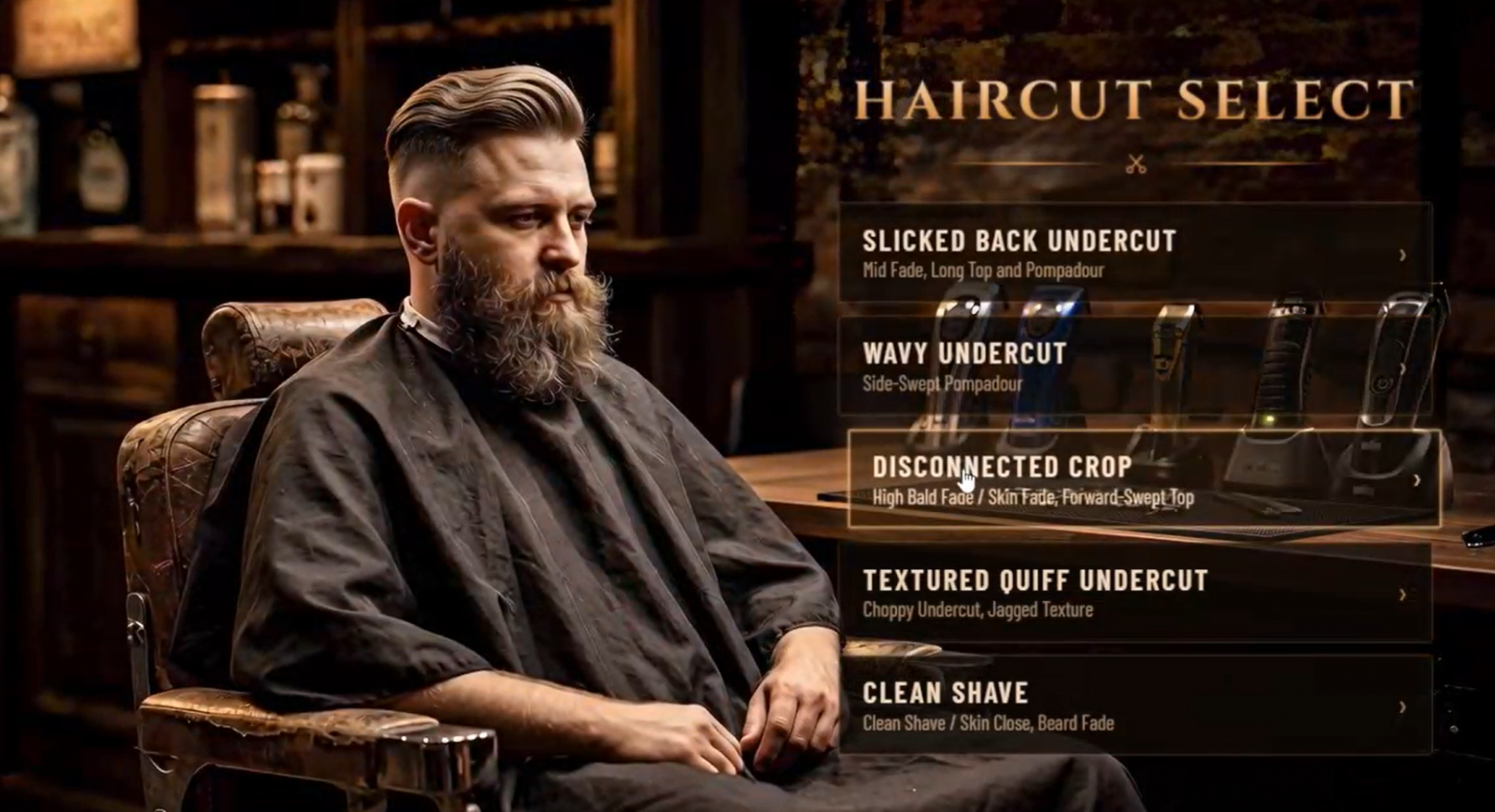
Если вы пробовали генерировать видео с интерфейсом — меню, кнопками, иконками — то знаете главную боль: видеомодели до сих пор «плывут» на мелких деталях. Кнопки дёргаются, текст превращается в кашу, элементы UI мерцают и деформируются. Разбираемся, почему так происходит и как обойти проблему с помощью гибридного пайплайна из трёх нейросетей, который даёт чистую типографику, точную анимацию и нулевой брак на деталях.
Почему нейросети плохо анимируют интерфейс в видео
Причина в самой природе видеомоделей. Они обучены генерировать органичное движение: людей, природу, камеру, свет. А интерфейс — это про строгую геометрию и стабильность: пиксель-в-пиксель ровные кнопки, читаемый шрифт, чёткие иконки, которые не должны «дышать» между кадрами.
Когда вы просите видеомодель нарисовать анимированное меню прямо внутри ролика, она пытается «оживить» текст и элементы UI как обычные объекты — и получается брак: буквы плывут, кнопки теряют форму, глиф мерцает. Плюс на такие попытки уходит куча токенов и генераций «в мусорку».
Решение простое по логике, но неочевидное на практике: не заставлять одну модель делать всё. Каждую задачу нужно отдать той нейросети, которая с ней справляется лучше всего.
Где генерировать
Запустить генерацию можно двумя способами:
- В телеграм-боте — удобно, если хочется работать прямо в мессенджере.
- Или на сайте — полный доступ ко всем моделям в одном интерфейсе.
Гибридный пайплайн: три нейросети, три задачи
Идея в том, чтобы развести задачи по разным моделям и собрать результат в единый ролик:
- Кинематографичную базу (сам видеоряд, движение камеры, свет) собираем в Seedance 2.0.
- Концепт интерфейса (статичные макеты меню и иконок) создаём в GPT Image 2.
- UI-слой (реальную, «живую» анимацию кнопок) выносим в кодинг через Claude.
Такой подход даёт полный контроль над анимацией, чистую типографику и нулевой брак на мелких деталях — потому что интерфейс мы не «уговариваем» нарисовать видеомодель, а собираем его на HTML/CSS, где всё пиксельно точно.
Разберём каждый инструмент подробнее — это как раз то, что чаще всего ищут те, кто только осваивает связку.
Seedance 2.0: видеогенератор, который работает как режиссёр
Seedance 2.0 — мультимодальная модель генерации видео от ByteDance (создателей TikTok). Её ключевое отличие от обычных видеогенераторов в том, что это не просто «текст → видео», а виртуальный режиссёр: вы задаёте сцену, движение камеры, свет, тайминг — и модель выполняет постановку целиком.
Именно поэтому Seedance хорошо подходит для кинематографичной базы ролика. В неё можно передать детальный промпт с описанием сцены, референсы кадров, структуру движения камеры (например, «статичный кадр 4 секунды → плавный отъезд → фиксация») и даже поэтапную анимацию объекта в кадре.
Версия Seedance 2.0 Pro — это расширенный вариант с более точным следованием промпту, что критично для длинных, детально прописанных сцен. Попробовать Seedance можно на сайте или в телеграм-боте.
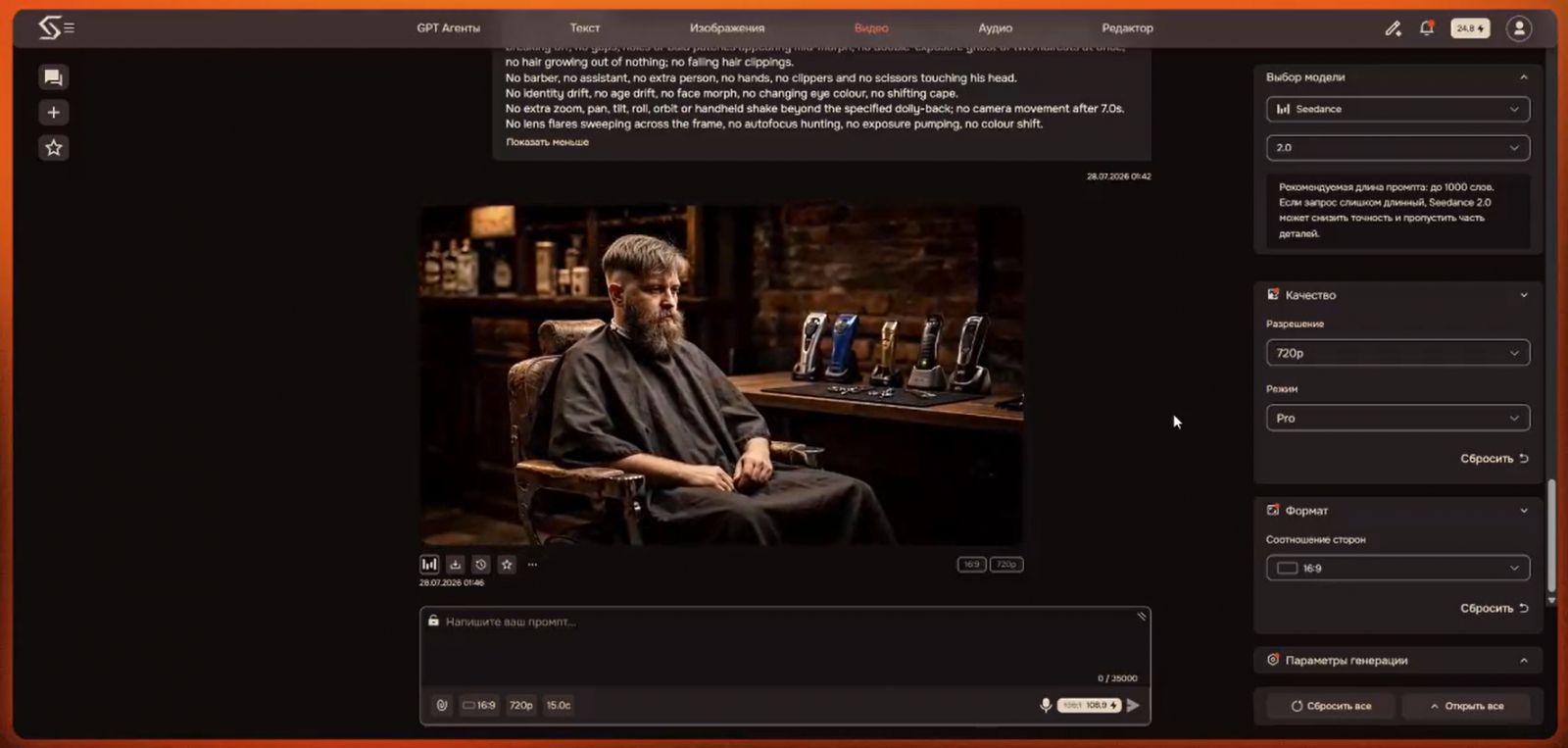
Как писать промпт для Seedance: главные принципы
Чтобы видео получилось стабильным, промпт стоит структурировать по блокам:
- Scene Context — что происходит в кадре, длительность, «один непрерывный дубль».
- References — какие изображения используются как референс и что именно из них брать (например, «только человека, игнорируя композицию»).
- Shot Structure / Camera — фазы движения камеры с точным таймингом в секундах.
- Framing — что и где расположено в кадре, никаких чёрных полос и пустот.
- Lighting / Color / Optics / Physics — свет, цветокор, оптика, физика объектов.
- Positive Locks и Negative — что жёстко зафиксировать и чего категорически избегать.
Чем детальнее блок Negative (никаких склеек, чёрных полос, «прыжков» причёски, мерцания, лишних людей в кадре), тем чище результат.
GPT Image 2 и Nano Banana: чем рисовать концепт интерфейса
Для статичного концепта UI — меню, кнопок, иконок, заголовков — нужна модель генерации изображений, которая умеет чётко и точно отрисовывать текст и макеты.
Здесь конкурируют два лидера 2026 года:
- GPT Image 2 — сильна в сложных макетах, строгом следовании инструкции, идеальном тексте (в том числе на русском) и инфографике. Лучший выбор, когда важна точная типографика и структура интерфейса.
- Nano Banana (Gemini Flash Image) — берёт скоростью и фотореализмом, отлично подходит для большого объёма генераций.
Для UI-концептов в пайплайне логично выбирать GPT Image 2 — именно из-за аккуратного текста и предсказуемых макетов. В неё можно передавать промпты вроде «наложи оверлей игрового меню слева, пункты Start Cut, Continue, Book Appointment, заголовок сверху, премиальные иконки, свечение на выбранном элементе» — и получать готовый концепт интерфейса поверх кадра.
Обе модели доступны в телеграм-боте и на сайте — можно сравнить результат на своей задаче.
Claude: генерация HTML/CSS-анимации интерфейса без «слива токенов»
Ключевой трюк всего пайплайна — не анимировать интерфейс в видео, а собрать его кодом. И здесь лучше всего работает Claude: модель отлично пишет чистый HTML, CSS и JavaScript, включая анимацию элементов при наведении мыши (hover), плавные переходы и интерактивные состояния кнопок.
Логика простая: видеомодель даёт кинематографичный фон, а поверх него живёт настоящий интерфейс на коде — с идеально ровными кнопками, чётким шрифтом и предсказуемой анимацией. Никакого мерцания и деформации, потому что это уже не «нарисованный» UI, а реальная веб-вёрстка.
Пример промпта для Claude:
«Напиши мне HTML-код для создания и анимации такого интерфейса, как на референсе. Фон должен быть зелёным, кнопки должны анимироваться при взаимодействии с мышью».
Чтобы результат был ещё точнее, в промпт для Claude стоит добавить:
- точные цвета (в HEX) и палитру;
- нужные состояния кнопок (обычное, наведение, нажатие, активное);
- тайминги анимаций (например, transition: 0.3s ease);
- шрифт и размеры, чтобы типографика совпадала с концептом из GPT Image 2.
Работать с Claude можно на сайте или в телеграм-боте.
Как собрать всё вместе: пошаговый алгоритм
Чтобы связка работала как единый конвейер, порядок действий такой:
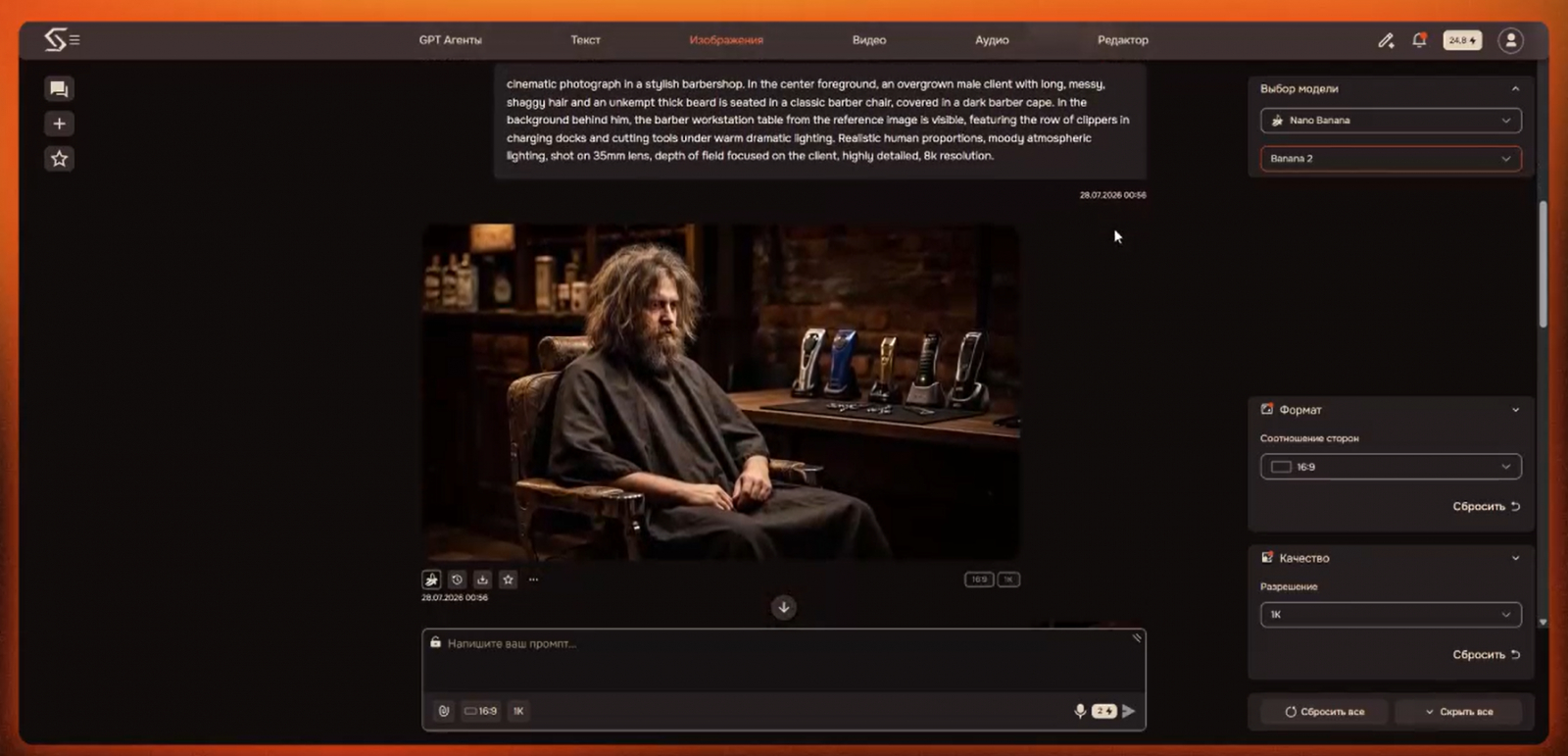
- Кадры-основа. Генерируем первые кадры сцены в GPT Image 2 (или Nano Banana), прикладывая референс для персонажа и окружения.
- Концепт интерфейса. В GPT Image 2 накладываем на кадр макет меню — заголовок, пункты, иконки, свечение выбранного элемента.
- Видео-база. Прописываем детальный промпт для Seedance 2.0 Pro: сцена, движение камеры по фазам, свет, физика, positive/negative-локи. Получаем кинематографичный ролик без встроенного UI.
- UI-слой кодом. В Claude генерируем HTML/CSS-версию интерфейса с анимацией кнопок под зелёный (или любой нужный) фон.
- Сборка. Накладываем интерактивный UI-слой поверх видеоряда — интерфейс остаётся чётким и стабильным, а фон — кинематографичным.
Почему это работает
Секрет в разделении ответственности между моделями:
- видеомодель делает то, что умеет лучше всего — движение и атмосферу;
- image-модель отвечает за точный визуал и типографику;
- Claude берёт на себя интерактив и анимацию UI на коде.
В итоге вы получаете полный контроль над анимацией, чистую типографику и нулевой брак на мелких деталях — без бесконечных перегенераций и слива токенов на попытки «уговорить» видеомодель нарисовать ровную кнопку.
Собрать весь пайплайн — Seedance 2.0, GPT Image 2 и Claude — можно в одном месте: на сайте или в телеграм-боте.
Подробные промпты:
Nano Banana | GPT Image 2 (Первые 2 кадра)
Профессиональная, кинематографическая фотография в стиле low-key, снятая с низкого угла в темном барбершопе. На переднем плане, в резком фокусе, на черном текстурированном резиновом коврике, лежащем на деревянной столешнице, расположены пара профессиональных парикмахерских ножниц и опасная бритва-шаветка со складной ручкой. За ними, на деревянной поверхности, выставлен ряд машинок для стрижки и триммеров. Четко видна машинка Andis в зарядной док-станции с рельефной ручкой и логотипом 'Andis'. Правее стоит крупная, футуристическая машинка в док-станции с надписью 'Braun' на базе. Далее слева видны другие машинки, включая синюю, все они находятся в легком боке. Драматическое боковое освещение создает яркие блики на металле и пластике, а индикаторы зарядки (зеленый огонек на Andis) добавляют теплые акценты. Задний план полностью размыт, создавая глубокое боке, в котором угадываются очертания кирпичной стены и полок. Малая глубина резкости, фокус строго на инструментах переднего плана. Угрюмая, стильная атмосфера.
(Прикладываем референс 1 кадра)
cinematic photograph in a stylish barbershop. In the center foreground, an overgrown male client with long, messy, shaggy hair and an unkempt thick beard is seated in a classic barber chair, covered in a dark barber cape. In the background behind him, the barber workstation table from the reference image is visible, featuring the row of clippers in charging docks and cutting tools under warm dramatic lighting. Realistic human proportions, moody atmospheric lighting, shot on 35mm lens, depth of field focused on the client, highly detailed, 8k resolution.
Интерфейс на картинках (GPT Image 2)
Apply a video game menu overlay on the middle left side of the image for a barbershop. Have menu options like Start Cut, Continue, Book
Appointment, etc. Have a title at the top saying “SYNTX Barbershop”. Premium video game UI design, make the color palette match the warm
colors of the shot. Premium UI icons next to each selection. Subtle UI selection glow on the Start Cut UI element.
Add a video game style barber selection menu to @img1 that matches the theme of @img2. Do not add the Syntx Barbershop title. The selection
menu will have “Haircut Select” at the top, and below the options listed: Low Taper, Mid Fade, Textured Crop, Modern Mullet, Bald Dragon. The menu
should be framed in the right side of the client
Анимация (Seedance 2.0 Pro)
SCENE CONTEXT
Photoreal cinematic footage, ONE CONTINUOUS TAKE inside a dark barbershop, 15 seconds, no cuts. It opens as a perfectly locked macro-wide product shot of five clippers standing in charging docks on a black rubber mat, with chrome scissors and a straight razor in the foreground; nothing moves except fine dust drifting through the amber light and one tiny green charge LED pulsing. After 4 seconds the camera begins a slow, smooth retreat that gradually opens the room: a bearded man seated in a worn brown leather barber chair comes into frame on the left, while the clipper table stays visible in the mid-background of the very same shot. Once the camera settles, his hair and beard transform through five haircuts as slow seamless morphs, the only thing changing in an otherwise motionless frame. The barbershop interior fills the entire frame from edge to edge at every moment.
ACTIVE REFERENCES @image1 — reference for the product table, matched 100% for photography, set dressing and lighting: photoreal row of five clippers standing in charging docks on a black rubber mat, brushed-gold clipper in the middle, black "andis." dock and black "BRAUN" dock in front (only the real physical product labels exist, no other text), one tiny green charge LED glowing, two chrome scissors and a straight razor lying in the foreground, dark aged brick wall and wooden shelving with blurred amber-lit tonic bottles behind. This exact table is the opening frame and remains in the background for the rest of the take. @image2 — reference for the man only: his face, his age, his heavy tangled dirty-blond shoulder-length hair, his full untrimmed beard, his matte black cape and his seated pose with the right hand resting slack on his thigh. Ignore the composition, the framing and any overlay of that reference completely — use only the person. He is placed inside a fully photographed barbershop interior that occupies the whole frame.
SHOT STRUCTURE — SINGLE UNBROKEN TAKE
Phase 1 · 0.0s–4.0s — STATIC HOLD on the clipper table. The camera does not move at all: no drift, no float, no breathing, no zoom, no parallax. The only motion in frame is fine dust floating slowly through the warm beam and the small green charge LED pulsing.
Phase 2 · 4.0s–7.0s — SLOW REVEAL. One continuous buttery dolly back with a gentle simultaneous boom up, easing in over the first 0.6s and easing out over the last 0.8s so it never jolts. The frame widens from the table to the full room: the barber chair and the man enter from the left and settle into the left half of frame, the clipper table shrinks and takes its place in the mid-background. Focus rolls smoothly from the front clipper dock to the man's eyes across 4.6s–6.4s — one single move, no snap, no hunting.
Phase 3 · 7.0s–15.0s — LOCKED WIDE on the man, camera essentially still with only a 1 cm organic float. Five haircut morphs play out inside this unchanged frame.
CAMERA
Start: lens 42 cm above the mat, 55 cm from the nearest clipper dock, horizon level, absolutely locked for the first 4 seconds.
Move: 4.0s–7.0s, straight backward dolly to 2.6 m from the man while the lens rises from 42 cm to 115 cm chest height; pure translation on a smooth track at a steady ~3 km/h with soft ease at both ends. No pan whip, no roll, no arc, no orbit, no handheld shake.
End: locked wide, the man's eyes on the upper third line, framing then completely unchanged for the remaining 8 seconds so the hair is the only element that changes in the picture.
FRAMING AND SET COVERAGE (critical)
The image is full-bleed 16:9 and the barbershop set physically continues across the entire width and height of frame, edge to edge, with no black areas, no dark panel, no border, no vignette block and no vertical seam anywhere. Every pixel of the frame shows real photographed room.
The man sits in the barber chair on the left side of frame, his head silhouette staying inside the left 52% of frame width. The clipper table sits in the mid-background between roughly 38% and 60% of frame width, clearly readable but soft, two stops darker than the man, its green LED still glowing as a tiny cool accent.
The right side of frame (66%–100% width) is filled by the natural continuation of the shop interior: dark aged brick wall receding into the room, a wooden shelf edge in deep shadow, and a tall mirror frame catching only a faint amber sliver along its very edge — all of it rendered out of focus and exposed two to three stops below the man, so it reads as soft low-contrast background rather than an empty void. Real brick texture and film grain remain visible there, but no bright highlight, no light source, no specular hit, no readable prop and no moving element.
The bottom 12% of frame shows the dark wooden floor of the shop, softly lit and low in contrast — real surface, never blackness.
HAIR MORPH TIMELINE — SMOOTH, SEAMLESS, NO POPPING
Five states, each reached through a slow continuous morph of 0.45s, eased in and out, then held rock-steady until the next one. The transformation reads like hair reshaping itself in one flowing motion, strands gliding, shortening and settling as a single connected mass.
• 7.00s–7.45s — MORPH 1, from the reference look (heavy tangled shoulder-length hair, full untrimmed beard) into STATE A: medium length on top combed back, short tapered sides and a clean neckline, full but shaped and defined beard. Held 7.45s–8.60s.
• 8.60s–9.05s — MORPH 2 into STATE B: short neat mid-fade, smooth skin-to-short gradient starting at the temple, sharp side line, 3 cm on top brushed to the side, trimmed 8 mm beard. Held 9.05s–10.20s.
• 10.20s–10.65s — MORPH 3 into STATE C: choppy piecey textured crop, short blunt fringe across the forehead, tight faded sides, short tidy beard. Held 10.65s–11.80s.
• 11.80s–12.25s — MORPH 4 into STATE D: cropped top and tight sides with a distinctly longer wavy length falling over the collar at the back, front kept tight. Held 12.25s–13.40s.
• 13.40s–13.85s — MORPH 5 into STATE E: nearly shaved scalp with faint stubble across the crown and one small textured patch, ears and skull shape reading clearly, beard down to close stubble. Held 13.85s–15.00s.
MORPH QUALITY RULES: the hair mass stays continuous and unbroken at every intermediate frame — no torn silhouette, no gaps, no holes punched in the hair, no strands detaching or flying off, no clumps vanishing abruptly, no scalp flashing through, no crossfade ghosting of two hairstyles stacked on each other, no jitter, no boiling texture, no stutter, no strobing. Volume redistributes smoothly, the hairline stays anchored to the same scalp position, the ears reveal themselves gradually rather than snapping into view, and the beard shortens within the same continuous motion as the hair. Every intermediate frame must look like a plausible real haircut mid-process, never a glitch. A whisper-faint warm sheen may travel over the head during each morph, at most a 20% brightness lift, nothing graphic.
PERFORMANCE
The man stays calm and heavy, unaware of the transformations: shoulders low, one hand slack on his thigh, breath visible in the slow rise of the cape, head angle and eye line constant so the hair is the only readable change. One slow blink between morphs. At 14.0s–14.6s his chin lifts 3 cm, his eyes shift to the lens, his jaw sets and the corner of his mouth tightens 2 mm. At 14.6s–15.0s a full hold, one slow blink, the frame settles. Skin at pore level with sun-worn texture across the nose, faint capillary flush on the cheekbones, wet amber catch-lights in both eyes, individual hair and beard strands resolving separately in every state.
OPTICS
One single lens, no focal length change, 47° FOV, rectilinear, neutral human perspective, no fisheye, no vignette pumping. Shallow depth in Phase 1 so only the two nearest docks are crisp with creamy falloff behind them. After the reveal the man is sharp from cape to hairline so every hair state is fully legible, while the clipper table and brick wall sit in gentle background separation. Focus changes only once, smoothly, during the camera move.
PHYSICS
Clippers, docks, scissors and razor keep exact mass, position and contact shadows welded to the mat — nothing slides, drifts or wobbles as the camera retreats, and their parallax is perfectly natural. Dust motes move slowly and randomly, never looping. The cape hangs with real cloth weight, folds shifting only with his breath, and never collects cut hair. Every new hairstyle sits with correct weight, hairline contact, ear coverage and shadow under the jaw the instant it settles.
LIGHTING
Warm tungsten practicals at 3200K, unchanged for the whole take: soft amber key from the shelf lamp at back-left raking across his right cheek and picking out the active hairline, low fill from front-right keeping the black cape and rubber mat readable, cool 4000K rim from an off-frame window right edging the chrome and the top of the head. Deep rich shadows, frame edges falling off gently by about one and a half stops while still holding visible texture, dust catching the amber beam in Phase 1, the tiny green charge LED as the single cool point, 15% haze visible at 4 m depth. Exposure, light direction, level and colour stay identical through the camera move and through all five hair states — no flicker, no auto-exposure shift.
COLOR GRADE
Amber-and-black palette built from material and beam: brushed brass on the middle clipper, oiled brown leather drinking the same amber, matte black rubber and black cape absorbing it. Blacks rich and dense but never crushed to pure zero, soft highlight rolloff on chrome, warm mid-tones without going orange. One consistent grade across the entire take.
WARDROBE
Matte black barber cape, dry cotton, slightly wrinkled over the armrest; plain skin-worn hands, no jewellery, no logos on the cape.
AUDIO
Quiet room tone with a low tungsten hum only. No music, no dialogue, no clipper or scissor noise.
STYLE
Photoreal live-action product and portrait cinematography, shallow depth, fine natural grain, 8K detail.
OUTPUT SETTINGS
15 seconds total, 8K, full-frame 16:9, the image filling the entire canvas with no padding, real-time speed throughout, one continuous shot, no slow motion, no speed ramps.
POSITIVE LOCKS
One single unbroken take from 0.0s to 15.0s. Camera perfectly static 0.0s–4.0s. Camera moves only 4.0s–7.0s, backward and slightly up, then locks again for good. The clipper table from the opening frame stays visible in the background for the rest of the shot. The barbershop interior fills 100% of the frame width and height at every moment. The man keeps identical face, age, eye colour, nose shape, skin texture, hands, posture and black cape through all five states — only hair and beard change. Each morph lasts about 0.45s, is perfectly smooth and unbroken, and each state then holds still. The green charge LED stays glowing throughout.
NEGATIVE
No cuts, no hard cut, no jump cut, no dissolve, no wipe, no transition of any kind — one take only.
No black bars, no black band, no black rectangle, no dark overlay panel, no side panel, no pillarbox, no letterbox, no matte border, no vignette block, no split screen, no diptych, no vertical dividing line, no hard seam, no empty void, no unrendered area, no flat black region, no gradient fade to black at the right edge, no aspect-ratio padding, no half-empty composition.
No text, no lettering, no captions, no subtitles, no titles, no logos beyond the real product labels, no graphic overlays, no icons, no watermark.
No hair popping, snapping, tearing, glitching, flickering, stuttering or exploding; no fragments, chunks or strands breaking off; no gaps, holes or bald patches appearing mid-morph; no double-exposure ghost of two haircuts at once; no hair growing out of nothing; no falling hair clippings.
No barber, no assistant, no extra person, no hands, no clippers and no scissors touching his head.
No identity drift, no age drift, no face morph, no changing eye colour, no shifting cape.
No extra zoom, pan, tilt, roll, orbit or handheld shake beyond the specified dolly-back; no camera movement after 7.0s.
No lens flares sweeping across the frame, no autofocus hunting, no exposure pumping, no colour shift.
Промпт для Cloude:
Напиши мне HTML код для создания и анимации такого интерфейса как на референсе, Фон должен быть зеленым, кнопки должны анимироваться при взаимодействии с мышью
📥 Сохраните статью, чтобы рабочий алгоритм всегда был под рукой.